
2025 W-2 Forms are now available in your GMS Connect employee portal here.

  • Payroll forms can put a lot of pressure on business owners. When you’re in charge of a small business, it’s up to you to make sure that these forms are not only completed accurately, but on time as well. If you’re not careful, the penalties can range from $50 per faulty form all the way up to hundreds of thousands of dollars for notable violations.

    One of the biggest struggles of managing payroll forms is simply knowing which forms apply to your business and what they do. We’ve compiled a list of payroll forms that you’ll likely need to know for your small business and how they work.
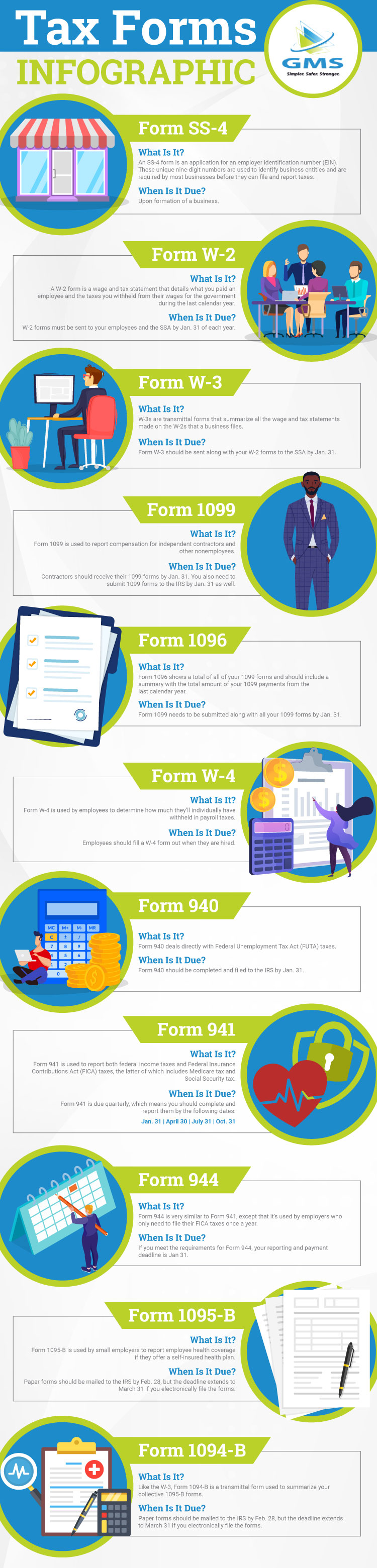
    Form SS-4

    What is it?

    An SS-4 form is an application for an employer identification number (EIN). These unique nine-digit numbers are used to identify business entities and are required by most businesses before they can file and report taxes.

    When is it due?

    Unless you’re just about to start your business and haven’t paid anyone yet, you likely already have an EIN. There are some situations where you may need a new EIN, which the IRS has listed on its site. Aside from those scenarios, you won’t have to worry about refiling form SS-4 once you have your EIN.  

    Form W-2

    What is it?

    A W-2 form is a wage and tax statement that details what you paid an employee and the taxes you withheld from their wages for the government during the last calendar year. W-2s need to be completed for any employee who worked for you in the past year and copies should be sent to the Social Security Administration (SSA) and the employee listed on the W-2. In addition, you should hold onto a copy of each W-2 for at least years.

    When is it due?

    W-2 forms must be sent to your employees and the SSA by Jan. 31 of each year. Most state governments set the deadline at Jan. 31 as well, but make sure to check with your specific state tax agency in case your state’s date differs. 

    You can also request extensions to file forms with the SSA and distribute forms to your employees. For an SSA extension, you’ll need to fill out Form 8809 and submit it to the IRS between Jan. 1 and Jan. 31. The IRS will then either deny your request or grant you a single 30-day extension. 

    As for distribution to employees, you must mail a letter to the IRS to request an extension. The letter must explain why you need an extension, your name, business address, EIN, and signature. If approved, the IRS will grant you either a 15- or a 30-day extension.

    Form W-3

    What is it?

    W-3 forms are closely related to W-2s. Essentially, W-3s are transmittal forms that summarize the all the wage and tax statements made on the W-2s that a business files. In short, if you fill out 10 W-2 forms for your 10 employees, Form W-3 should represent a total of all 10 W-2s.

    When is it due?

    Form W-3 should be sent along with your W-2 forms to the SSA by Jan. 31. However, you don’t need to send W-3s out to your employees.

    Form 1099

    What is it?

    Form 1099 is used to report compensation for independent contractors and other nonemployees. If you pay a contractor more than $600 in a year, you need to report how much you paid them to both the contractor and the IRS so that these wages can be evaluated for tax purposes.

    When is it due?

    Contractors should receive their 1099 forms by Jan. 31. You also need to submit 1099 forms to the IRS by Jan. 31 as well.

    Form 1096

    What is it?

    Remember how the SSA requires a Form W-3 to show a total of all your W-2 forms? Form 1096 has the same relationship with your 1099 forms and should include a summary with the total amount of your 1099 payments from the last calendar year.

    When is it due?

    Form 1099 needs to be submitted along with all your 1099 forms by Jan. 31.

    Form W-4

    What is it?

    Form W-4 is used by employees to determine how much they’ll individually have withheld in payroll taxes. On this form, your employees will note how many withholding allowances apply to them. These allowances will allow you to determine the amount of payroll taxes each employee will have withheld from their paychecks.

    When is it due?

    Form W-4 doesn’t have an annual due date like other payroll forms. Instead, employees should fill a W-4 form out when they are hired. The IRS does recommend that employees submit a new W-4 form each year to account for any financial or personal changes, but it’s not mandatory. In this case, simply continue to withhold taxes based on an employee’s original Form W-4 until he or she provides a new one.

    Form 940

    What is it?

    Form 940 deals directly with Federal Unemployment Tax Act (FUTA) taxes. Your business must pay FUTA taxes if you meet the following requirements:

    • You paid at least $1,500 in wages in any calendar quarter during the past two years
    • You had one or more employees for at least some part of a day in any 20 or more different weeks during the past two years

    FUTA taxes are based on employee wages, but are only paid by the employer and not the employee, so make sure not to withhold FUTA taxes from employee wages. These taxes are paid quarterly and then reported once a year through Form 940.

    When is it due?

    Form 940 should be completed and filed to the IRS by Jan. 31. However, the IRS will extend the filing due date to Feb. 10 if you pay all your FUTA taxes on time.

    Form 941

    What is it?

    Form 941 is used to report both federal income taxes and Federal Insurance Contributions Act (FICA) taxes, the latter of which includes Medicare tax and Social Security tax. If your business’ quarterly tax liability is between less than $2,500, you can also use Form 941 to make tax deposits as well. If your liability is more than $2,500, the IRS requires that you follow a deposit schedule.

    When is it due?

    Form 941 is due quarterly, which means you should complete and report them by the following dates:

    • Jan. 31
    • April 30
    • July 31
    • Oct. 31

    Form 944

    What is it?

    Form 944 is very similar to Form 941, except that it’s used by employers who only need to file their FICA taxes once a year. The IRS grants an exemption for small employers whose annual liability for social security, Medicare, and withheld federal income taxes is $1,000 or less for the year. If your business falls within those limits, you get to file Form 944 instead of Form 941.

    When is it due?

    If you meet the requirements for Form 944, your reporting and payment deadline is Jan 31.

    Form 1095-B

    What is it?

    Form 1095-B is used by small employers to report employee health coverage if they offer a self-insured health plan. With a self-insured plan, employers pay medical bills instead of just a premium, so the IRS requires Form 1095-B to verify that individuals on your plan had minimum essential coverage. If you offer a fully-insured plan, your health insurance provider will fill out and file Form 1095-A for you.

    When is it due?

    A copy of Form 1095-B should be filed for each full-time employee covered by your plan. Individual forms should be mailed to corresponding employees by Jan. 31. The filing deadline for the IRS differs depending on how you send Form 1095-B to them. Paper forms should be mailed to the IRS by Feb. 28, but the deadline extends to March 31 if you electronically file the forms. It’s also important to keep a copy of each employee’s forms.

    Form 1094-B

    What is it?

    Like the W-3, Form 1094-B is a transmittal form used to summarize your collective 1095-B forms. This form is very simple and only requires some basic company information and a total for the number of 1095-B forms you will submit along with Form 1094-B.

    When is it due?

    The deadlines for 1094-B are the same as Form 1095-B. The only difference is that employees do not receive 1094-B.

    Place an Emphasis on Proper Payroll Management

    Payroll forms can be tricky, but they’re just one part of the payroll puzzle. Payroll administration is comprised of many different steps and responsibilities that can have major impacts on your business. To see just how much can go into the payroll process, check out our guide on what it takes to manage payroll for a small business.

    Even when you have a good understanding of each payroll form, the time and effort it takes to complete them and manage your payroll can put a serious dent in your schedule. That’s why many owners turn to GMS to handle payroll administration for their small business. Our experts take an active approach to managing your payroll so that you can spend your time growing your business instead of struggling with forms and tax calculations.

    Want to find out how GMS can save you time and money while strengthening your business’ HR functions? Contact GMS today to talk to one of our experts about your business.

  • 2020 has brought an abundance of challenges to people all over the world. It seems that when we think that things can’t get any worse, we are hit with another obstacle. With all the uncertainty, lost jobs, illness, and lack of toilet paper, it’s easy to say that this year has been anything but a smooth ride. 

    Overall, this year and pandemic has taken a major toll on many people’s mental health and well-being. It is so important now more than ever to be aware of your employee’s health and be sure they are given the necessary resources to live as stress free as possible. 

    An employee relaxing to help support mental health in the workplace. 

    COVID-19’s Impact on Employees’ Mental Health

    The stress of COVID-19 has caused a great amount of fear to more aspects of people’s lives other than just catching the virus. Individuals are losing jobs and becoming financially unstable, graduating college students are being thrown into one of the worst job markets, death rates from the virus are increasing by the day, and people who quarantine are missing social interaction with friends and family. 

    Below is a list of just some of the mental health statistics in America.

    • In late June 2020, 40 percent of adults in the U.S. stated that they have been struggling with mental health issues or substance abuse. (CDC)
    • The rate of moderate to severe anxiety peaked in September of 2020, with over eight in 10 people who took an anxiety screen scoring with moderate to severe symptoms. (Mental Health America)
    • An estimated 26 percent of Americans ages 18 and older – about one in four adults – suffers from a diagnosable mental disorder in a given year. (John Hopkins Medicine)

    What Employers Can Do to Support Employees’ Mental Health

    Many individuals may feel stressed or pressured to go into their work facilities or offices. There are multiple ways for employers to take care of their employees during these difficult times.

    Create a system of support and trust

    Let your employees know that you are there for them and form a sense of trust. One of the issues people face is not knowing where to turn in times of hardship. Being open and transparent with your employees can give them the opportunity to search for help before things become too overwhelming for them.

    Provide your employees with resources

    It is absolutely necessary for all employees to have access to beneficial resources to educate them and help them cope with mental health issues. Some examples of helpful websites are the American Psychological Association, Anxiety and Depression Association of America, and the CDC. These sites all include information on a variety of mental health issues as well as ways to improve symptoms and live a healthier life. Also, your company’s HR departments should consider providing an Employee Assistance Program for all employees, with access to licensed professionals. 

    Create a healthy work environment

    Employees can feel less stressed or anxious at work if the environment is positive. Have casual conversations with them and get to know them on a personal level. Also, have biweekly or monthly check-ins to see how your employees are feeling or if they are having any additional stress in their life. Form a culture that is inviting, happy, and supportive.

    Hold mental health trainings

    The best way to inform all employees to be aware of mental health is having all-office trainings. Educating your company on what mental health is, what the warning signs are, and how to take care of themselves and others can make a huge difference. This can help prevent issues further down the line and reassure others that it is ok to struggle with mental health.

    If you or someone you know is struggling with a mental illness, reach out to your primary care provider. For emergencies, contact the SAMHSA National Help Line at 1-800-662-HELP.

  • Running a business is difficult enough. Keeping track of the Occupational Safety and Health Administration’s regulations makes your job as an employer even more complicated.

    It’s not uncommon for small business owners to not fully understand the OSHA regulations that apply to their business – after all, there are a lot of them. However, noncompliance with OSHA regulations can not only put your employees in potential danger, but also lead to costly penalties that will set your business back financially. 

    An inspector with an OSHA compliance checklist with requirements for small business owners. 

    Who is Covered Under OSHA?

    The general rule of thumb is that if your business has employees, those employees are likely covered by federal OSHA regulations. There are a few exclusions to this, such as people who are self-employed, public sector employees, and family members who work on a farm. 

    Even with those omissions, the vast majority of businesses must meet OSHA safety and health requirements. However, businesses with 10 or fewer employees are defined as partially exempt by OSHA. This partial exemption means excludes these small business from some key responsibilities.

    Another important note is certain states have their own OSHA-approved health and safety plans. OSHA still monitors these state plans, but the state laws take precedence over federal rules. As such, you’ll need to double check your state’s exact regulations to see if they differ from federal OSHA laws. OSHA includes a map with all the active state health and safety plans and contacts on its website.

    OSHA Requirements for Small Business Owners

    Whether your business is partially exempt or not, OSHA affects your company in several ways. Employers have multiple responsibilities to ensure that their business is compliant with OSHA standards. 

    Provide a workplace free from serious recognized hazards

    The first major OSHA requirement for employers is to conform workplace conditions to applicable OSHA standards. These standards mandate that employers should identify and correct any safety and health hazards present in the workplace. If any hazards can be eliminated or reduced through feasible changes in working conditions, then those changes must be made to comply with OSHA standards.

    These dangers can vary greatly depending on the nature of your business. For example, a construction site may require safety measures such as fall protection, guards on machines, and removal of hazardous waste. Meanwhile, adding ergonomic seating may limit health risks in office environments. For an exact list of regulations, please refer to OSHA Standards – 29 CFR.

    Part of these changes often include ensuring that employees have the proper tools and equipment to complete their jobs safely. You must provide the correct personal protective equipment (PPE), such as gloves, eye protection, and more. Any tools and equipment must be properly maintained. Furthermore, it’s a small business employer’s responsibility to provide safe tools and equipment – employees should not be required to provide their own PPE aside from everyday clothing and items.

    Give employees the information necessary to protect themselves

    Another key OSHA requirement for small business owners is to provide employees freedom in their right to information. As an employer, you are expected to provide your workers with a few different forms of information.

    • On-site OSHA poster
    • Hazardous chemical details
    • Employee training

    On-site OSHA poster

    Every workplace has OSHA poster requirements for small businesses and large businesses alike. Regardless of company size, each business should have an OSHA or state-plan compliant poster on premises. Employers are required to display this poster in a prominent place so that employees can review their rights under OSHA law. An approved OSHA “It’s the Law” workplace poster is available for free online.

    Hazardous chemical details

    Any hazardous chemical containers must be properly labeled. These labels should not only identify the hazardous substance, but also include appropriate warnings. You should also keep Safety Data Sheets (SDSs) for every substance that your employees may encounter. These SDSs must be readily available to workers so that they can review them and learn about the chemicals, their effects, exposure prevention, and emergency treatment.

    Employee training

    OSHA requires employers to train employees about potential dangers and what they can do to stay safe on the job. Per OSHA rules, there are four different topics that should be addressed during employee training procedures.

    • Hazardous substance training. This training should include how to read SDSs and what to do when handling any incidents. 
    • Blood-borne pathogen training. Any employees who may be exposed to blood-borne pathogens during regular duty should be trained about how to deal with blood-borne pathogens in case of an emergency.
    • Emergency situation training. Employees should be trained on what to do in emergency situations, such as how to exit the building. 
    • OSHA inspector training. Employees should be trained on what to do if an OSHA inspector ever visits your workplace.

    Employers must communicate training in a language and vocabulary workers can understand. The method of communication depends on how many employees you have. Businesses with 10 or fewer employees can orally communicate a training plan to meet OSHA standards. Businesses with more than 10 employees must share a written plan that is kept in the workplace and available for employees to review at all times.

    Recordkeeping requirements

    Depending on the size of your business, OSHA may require you to keep records of serious work-related injuries and illnesses. Every accident should be recorded in the OSHA 300 log available online. Employers do not need to record minor injuries that only require first aid. Instead, employers should record the following injuries and illnesses listed by OSHA.

    • Any work-related fatality
    • Any work-related injury or illness that results in loss of consciousness, days away from work, restricted work, or transfer to another job
    • Any work-related injury or illness requiring medical treatment beyond first aid
    • Any work-related diagnosed case of cancer, chronic irreversible diseases, fractured or cracked bones or teeth, and punctured eardrums
    • Special recording for work-related cases involving, needlesticks and sharps injuries, medical removal, hearing loss, and tuberculosis

    It’s also important to note that recordkeeping is another area affected by partial exemption. Businesses with 10 or fewer employees do not need to maintain OSHA injury and illness records unless OSHA or the U.S. Bureau of Labor Statistics specifically instructs them to in writing. Employers in certain low-hazard industries are also exempt from this requirement.

    Reporting requirements

    OSHA is going to want to know about serious accidents or illnesses that occur at your workplace. These reporting requirements change depending on the severity of the issue. To start, employers are required to record any minor accidents and illnesses in the OSHA 300 log within seven days. 

    More serious incidents require added urgency and reporting measures. Workplace accidents that result in at least one death or send three or more employees to the hospital must be reported within eight hours. Meanwhile, employers must report work-related inpatient hospitalizations, amputations, and eye loss within 24 hours. For these types of incidents, you can report to OSHA through the following means:

    Once an incident occurs, you must post OSHA citations either at or near the work area involved. These citations should stay posted for at least three working days or until the violation is corrected (whichever is longer).

    Whistleblower protection

    OSHA will crack down hard on any employers who discriminate against employees who file complaints alleging OSHA violations. The Whistleblower Protection Program disallows employers from taking adverse actions against employees who engage in protected activities. These actions include, but are not limited to:

    • Firings or layoffs
    • Demotions
    • Denial of overtime or promotion
    • Reduction of pay or hours
    • Intimidation or harassment
    • Denial of benefits

    Potential OSHA Violations for Noncompliance

    While there are several different criteria to maintain OSHA small business compliance, not all violations are viewed in the same light. There are four different types of OSHA violations, each of which have distinct penalties.

    • Willful violations. Any violations that OSHA deems were intentionally and knowingly committed by an employer with plain indifference to the law. Penalties for willful violations can range from $5,000 up to $70,000 for each offense.
    • Serious violations. These violations occur when an employer knew, or should have known, about a hazard that would likely lead to death or serious physical harm. Serious violations can lead to penalties of up to $7,000.
    • Other-than-serious violations. These violations are also tied to the safety and health of employees, but the hazard in question probably wouldn’t lead to death or serious physical harm. Other-than-serious violations can result in penalties of up to $7,000.
    • Repeated violations. A business that commits violations that are similar to past offenses are committing repeated violations. OSHA can penalize businesses up to $70,000 for every repeated violation.

    Prevent OSHA Small Business Issues with Proactive Risk Management

    Workplace hazards are a major problem for any small business. Workplace injuries and illnesses can not only impact the wellbeing of your employees, but also cause OSHA to visit your business. Fortunately, there are ways you can mitigate, or even avoid, OSHA  inspections and penalties.

    At GMS, we help business owners take control of workplace safety through proactive risk management. Our team works with you to provide onsite consulting, training, and jobsite inspections to identify potential problem areas and help your small business stay compliant with OSHA regulations. We’re also there to handle key investigations and deal with OSHA on your behalf in case an incident ever does occur.

    Need a partner that can help your small business stay ahead of risks and avoid costly penalties? Contact GMS today about how we can save you time, money, and plenty of headaches by helping you take control of critical HR functions.

  • Managing payroll is no simple process. There are several different steps and responsibilities that you need to address, all of which make managing payroll for a small business both time-consuming and difficult. Of course, that process becomes even more stressful when the IRS comes knocking.

    While the overall odds of an IRS audit for a small business is low, there are certain factors that can greatly increase the chances that your organization is targeted. The IRS looks for a variety of red flags to identify taxpayers and businesses that are more likely to have inconsistencies in their taxes. Here are nine small business IRS audit triggers that may increase your odds of an inspection in the future.

    A person preparing for IRS small business audits. 

    Consistently Filing Payroll Taxes Late

    Late payroll tax filings can lead to more than just penalties. Regularly missing filing deadlines is a surefire way to get your small business on the IRS’ radar. It’s in your best interest to try and file your taxes in a timely manner, even if that means you’ll need a head start to get them done. Remember, it’s better to get ahead of schedule than deal with IRS headaches in the future.

    Failure to Report Taxable Income

    Late filings are one thing, complete failure is another. A failure to report your payroll taxes is just about the biggest red flag of all for the IRS. 

    Not reporting your own personal income is also another warning sign. The IRS wants to ensure that you aren’t withholding income in your calculations. If you fail to report payroll taxes or personal income, you should expect to hear from the agency at some point.

    Reporting Net Losses in Multiple Years

    If your business has reported net losses in three or more of the past five years of operation, the IRS may want a closer look at your books. The IRS typically assumes operations that  show a profit in at least three out of five years are legitimate companies. As such, the IRS may view businesses with multiple net losses in recent years as a potential offender of hobby loss rules.

    In short, the IRS wants to identify if your business has “an actual and honest profit motive” and not just a hobby that’s abusing tax deductions. The problem is that these hobby loss rules can disallow certain deductions that may have saved you money. As such, you’ll want to make sure that any deductions you claim for your business are supported with the appropriate receipts and documentation.

    Too Many Deductions

    Claiming tax deductions available to your small business is one of the simplest ways to reduce your income tax bill. However, claiming too many deductions can put you and your small business at greater risk for an IRS tax audit.

    It’s important to be careful when you choose your deductions as a small business owner. The general rule of thumb for the IRS is that your expenses should be considered “ordinary and necessary” for your line of business. If you think that a meal, stop for gas, or travel expense pushes the boundaries of ordinary and necessary, it may be safest to not make a claim. This is especially true for sole proprietors, as they are at greater risk for audits than other small business owners.

    Another potential red flag for the IRS is if you suddenly claim more deductions than you had in past years. The IRS may see a sudden increase in deductions as suspicious and may audit you to make sure this new trend is by the books. To avoid this from happening, compare your deductions from recent years to make sure you’re consistent with your deductions.

    Excessive Claims of Business Use for a Vehicle

    Car expenses can be typical for many business owners – the IRS even publishes standard mileage rates for businesses each year. However, the IRS is quick to scrutinize whenever someone claims 100 percent business use of a vehicle. If you do, you’ll want to carefully document not only your vehicle expenses, but also the purpose of your various trips. The IRS will want to know whether your business vehicle was used for legitimate business-related activities and not personal commuting expenses like driving to your office from home.

    Another potential red flag for the IRS is if you deduct expenses in multiple ways. The IRS allows you to determine deductible car expenses through the standard mileage rate or actual expense methods such as fuel, repairs, and general upkeep. While you can choose between the two deduction methods, you cannot use both in the same year. If you do, the IRS may come calling about your business deductions. 

    Net Operating Loss Carrybacks or Carry-Forwards

    It’s not uncommon for small businesses to carry forward net operating losses to reduce a company’s future tax liability. In fact, the CARES Act amended rules to allow “for a carryback of any net operating loss (NOL) arising in a taxable year beginning after Dec. 31, 2017, and before Jan. 1, 2021.” As such, small business owners have some additional flexibility to account for net operating losses.

    While these carrybacks and carryforwards are allowed, they can increase the odds of an IRS audit. The IRS will want to make sure that these transactions are up to agency standards and that everything is conducted legally. Make sure to properly document any such carrybacks or carry-forwards to make sure your business is in the clear in the case of an IRS audit.

    Giving Large Sums to Charity

    Donations are a great way to support important causes and help people in need. Unfortunately, the IRS adopts a more skeptical view of small businesses giving to charity. If your business suddenly increases the amount of money donated in a year, the IRS may want to make sure that these donations aren’t an attempt to abuse the tax code.

    One way to avoid IRS scrutiny is to maintain a steady level of donations each year. By slowly scaling up your charity efforts, the IRS will have less reason to find your donations as a suspicious way to avoid paying small business taxes.

    Cash Transactions

    Businesses that deal mostly in cash transactions are naturally bigger targets for the IRS. The explanation for this is because it’s much more difficult to verify cash income. Because of this reason, your small business may simply be more prone to IRS audits if you regularly process cash transactions.

    Large cash transactions are another sign that can trigger an audit. Purchasing new business equipment, company vehicles, or other investments with cash will potentially draw agency attention. If you can, try to pay for these business expenses using credit or debit cards to avoid IRS scrutiny. 

    If you prefer cash, just make sure to maintain detailed records of cash transactions to help in the case of an audit. You can also complete IRS Form 8300 for any receipts exceeding $10,000 within the U.S.

    Rounded Numbers and Calculation Errors

    Sometimes simple mistakes can lead to IRS scrutiny. As you may expect, mistakes on your tax filings are going to attract IRS attention. However, you may not realize that you’re making a mistake when you do the math.

    One common issue with tax returns occurs when small businesses use rounded numbers. While rounded numbers may seem convenient, the IRS will get involved if they see that a business isn’t using exact numbers to denote earnings and expenses for tax purposes. The best way to be safe from this red flag is to avoid average and round numbers and always work in decimal points unless otherwise specified in your tax filings.

    Protect Your Small Business from IRS Penalties and Other Dangers

    Filing payroll taxes is no simple process. Not only is the filing process complex, the rules regularly change from year to year to make it an even more confusing task. Fortunately, you don’t need to let payroll tax management take up too much of your busy schedule.

    When you need to free yourself from the struggles of payroll tax management, GMS can help. Our experts can not only save you valuable time, we can also help you stay up-to-date with ever-changing regulations and avoid costly penalties. Contact GMS today to talk to our team about how we can make your business’ payroll simpler, safer, and stronger.

  • It’s no secret that HR management is an extremely complex and time-consuming process for any small business. That’s why many small business owners turn to Professional Employer Organizations (PEOs) to help companies take control of key HR functions like payroll and employee benefits. Of course, there’s one major question for anyone interested in these services: How much does a PEO cost? 

    PEO pricing can vary greatly depending on the PEO you work with and the services you need. Regardless of your needs, it’s critical to partner with a PEO that can not only simplify your business’ HR needs, but also save your organization more money than you spend. Let’s break down how PEO pricing works and what you can expect to pay for HR outsourcing.

    A notebook containing PEO costs. 

    What Do You Pay for When Partnering with a PEO?

    There are multiple factors that impact PEO pricing. The simplest answer is your PEO costs cover a couple of different items:

    • Administrative fees
    • Setup costs
    • Pass-through costs or additional fees associated with different HR functions

    It’s important to note that PEO costs only apply to what you pay the PEO for services rendered and not business costs like payroll taxes and health insurance premiums. For example, you would still owe payroll and workers’ compensation taxes even if you did not partner with a PEO. However, a PEO can work with you to manage these functions and potentially save you money through means like master health plans and self-insured workers’ compensation.

    Administrative fees

    A PEO’s administrative fees are a set rate that accounts for all the ongoing work involved with managing a company’s account. These costs cover tasks that vary from handling payroll and payroll tax deposits to managing and paying workers’ compensation premiums. It also covers any time spent assisting business owners with any HR problems and questions that inevitably arise over time.

    PEO pricing for administrative fees can vary greatly based on the company you work with and the services they provide. For example, a PEO that only offers basic payroll and workers’ compensation assistance will have lower rates than a PEO with a comprehensive suite of HR services. 

    Administrative fees are typically invoiced every pay period. The specifics on how much your company is billed for administrative fees depends on the pricing model. There are three main pricing models that PEOs use for administrative fees.

    • Percentage of payroll
    • Per employee
    • Per check

    Percentage of payroll

    This pricing model bases administration fees around a flat percentage of your overall payroll. The percentage charged is based on multiple factors such as your total number of employees and payroll. The exact percentage depends on the PEO, but a typical range falls between two and six percent. However, business with seasonal employees may see percentages higher as a result of all the part-time workers.

    One advantage of the percentage model is that it helps business owners understand what they’re paying each pay period in administration fees – simply identify total payroll for the period and apply your flat percentage. However, this percentage can pose problems on occasions when your payroll is notably higher than usual, such as bonus payout periods. Depending on the PEO, you may be able to make special arrangements to adjust for bonus runs and avoid extra administration fees.

    Per employee

    Another pricing model is to charge an administrative fee for each of your company’s employees. This method means that a PEO’s fees aren’t tied to total employee compensation, which can be an attractive option. 

    The exact per employee rate can depend on the PEO in question. A more basic PEO may have rates as low as $10 per employee per week, whereas companies with more comprehensive offerings and customer service may be four times that amount.

    Per check

    The final pricing model is to pay administration fees per check. The PEO can calculate the number of payrolls and identify a flat fee to charge for every paycheck you hand out each pay period. The per check model is similar to the per employee approach in that it doesn’t tie your fee rates to your overall payroll.

    Per check fees can become complicated if your business has a large number of part-time employees who split up a certain number of hours. For example, if one person works a different day each week, you’ll need to cut checks out to each individual. This scenario will drive up your fees as opposed to one person working the same amount of hours. As such, the per check pricing model is better suited for businesses with more full-time employees.

    One-time and annual setup fees

    All PEOs will have some form of initial setup fee when you start your partnership. These one-time setup fees are designed to cover all the frontloaded services done to get your company up and running with a PEO. These tasks include a wide variety of setup project, some of which include:

    • Onboarding employees
    • Gathering necessary documents and information
    • Establishing payroll and direct deposit
    • Setting up withholdings for payroll, benefits, 401(k), etc.

    As you may expect, these initial setup fees vary depending on your PEO of choice. Typically, you’ll find that the majority of these fees range from $50 to $200 per employee. Certain services may also require additional setup fees or annual costs. For example, companies that use a PEO to manage 401(k) plans would owe a small setup fee for the plan, along with an annual service charge.

    Additional services

    While administrative and setup fees make up the vast majority of PEO costs, some PEOs also offer a variety of additional services available when needed. The exact services depend on what the PEO had to offer, which can include:

    • Background checks
    • Drug and alcohol testing
    • Drug-free safety plans
    • Flu shots
    • Employee assistance programs
    • Training programs (First aid, CPR, supervisor/leadership)
    • Recruitment/ad placement
    • Translation services

    Each of these services will typically call for some type of pass-through cost when you need them. The pricing models vary greatly based on the service. For example, a background check may cost around $10 to $40 for each check. Other services may charge a flat rate based on the number of employees participating. Your PEO should be able to provide clear pricing for these additional service in advance.

    Bundled vs. Unbundled PEO Billing

    Pricing models and setup fees are only part of the billing puzzle. It’s also important to factor in how your PEO presents your bill every pay period. There are two main ways that PEOs invoice companies:

    • Bundled bills
    • Unbundled bills

    Some PEOs opt to bundle all their rates and other HR costs into a single line item. This process makes it difficult to parse out exactly how much you’re paying for each cost, including your PEO fees. While you can subtract all of your HR costs – social security, Medicare, workers’ compensation, etc. – it takes time and knowledge of established tax rate to break down your exact PEO costs.

    Unbundled billing simplifies this process. This method breaks out each cost as an individual line item, allowing you to clearly see what you’re being charged for everything on your invoice. As such, unbundled billing means you can always identify how much a PEO charges for administrative fees without an extensive amount of math.

    Find the Right PEO for Your Business

    Comparing quotes is an important part of evaluating PEOs, but costs are just one part of the puzzle. It’s important to find a PEO that not only offers the services you need, but also the best, most cost-effective approach to making your business simpler, safer, and stronger.

    All PEOs are not created equal. At Group Management Services, we strive to take the administrative burden off your shoulders and work with you to find the right solution for your HR needs. Contact GMS today to talk to one of our experts about how we can save you time and money through expert HR management.

  • As politics become more polarizing, small businesses can get stuck in an uncomfortable position. For every employee who can express political beliefs without creating any issues within the workplace, certain conduct can have a direct impact on your business.

    Managing political discussions in the workplace is a tricky balancing act. On one hand, different opinions and an open culture can create new relationships and creative ideas. On the other hand, certain discussions can create animosity between individuals that fractures company morale and impacts productivity. Employers must also consider potential legal protections for political speech. 

    With all these factors, it’s easy to view political debates in the workplace as ticking time bombs for your business. Fortunately, there are steps you can take to manage political discussion in the workplace and protect your business.

    A group of employees arguing after discussing politics in the workplace. 

    Understand Your Legal Responsibilities Regarding Political Discussion

    Before you can take measures to handle political activity within the workplace, it’s essential to understand what you can and can’t do in terms of managing political discussions as an employer. Certain regulations may limit your potential options for preventing problems created by heated political discussions, so it’s critical to stay compliant with existing local and federal laws.

    One of the most notable potential concerns about limiting political discussion in the workplace is the First Amendment. According to the National Law Review, “in most states, employees of private companies are not protected from discrimination based purely on political affiliation or activity.” While the First Amendment prohibits the government from restricting free speech, private employers are generally able to set their own rules regarding acceptable speech. This means that small business owners do have some control over what can be said in workplace scenarios.

    Of course, there are some notable exceptions to what private employers can prohibit in terms of political talk. To start, the National Labor Relations Act allows private employees to discuss labor-related issues, such as wages and hours. This also extends to topics like working conditions and unionization, which some may construe as political. 

    Certain states and cities also have laws in place to protect political expression. Employers should not be seen as taking any measures to discriminate against employees for their political or voting activities. In addition, many states and cities disallow employers from influencing their employees’ political decisions as well. These rules can vary by state or city, so you’ll need to review your local laws to see if your business is affected by any of the following: 

    • Laws to prohibit employers from retaliating against employees for engaging in “political activities.”
    • Laws to protect employees’ right to express “political opinions.”
    • Laws to disallow discrimination against employees based on party membership or engagement in election-related speech and political activities.

    What Small Businesses Can Do to Manage Political Discussions in the Workplace

    While existing laws create some limitations in terms of what you can and can’t prohibit, there are measures you can take to manage political debates among employees without leaving yourself in legal trouble.

    Create policies against discrimination that apply to all employee groups

    One major point of contention in political discussions gone wrong is when one or more employees view another worker’s words or actions as discriminatory. One person’s opinion may seem like harassment to another, which can create serious internal concerns. 

    While you may not be able to cleanly parse through people’s opinions, you can institute anti-discrimination and harassment policies to snuff out any egregious behavior inside and out of political discussions in the workplace and online. These policies can make it clear where your business stand when it comes to discrimination against:

    • Race
    • Gender
    • Age
    • Religion
    • Ethnicity/nationality
    • Disability/medical history
    • Marriage/civil partnership
    • Pregnancy/maternity/paternity
    • Gender identity /sexual orientation

    You should also make it clear how employees can safely report harassment in the workplace. Employers are obligated to take any harassment or discrimination claims seriously and investigate all employee complaints. If you deem that any political discussion devolved into harassment involving the aforementioned protected characteristics, you can use that as grounds to resolve the situation quickly and effectively, whether that’s a warning to the offending party or further punishment.

    It’s also important to make sure that these policies are equally applied for all employees. Every individual should be held to the same standards when it comes to discussing politics at work whether they are an entry-level employee or an executive.

    Have a policy to limit or ban visual political displays

    Political discussions don’t need casual conversations to become an issue. Visual displays such as posters, stickers, or campaign buttons can trigger unwanted conversations unless you put a policy in place to prevent these problems.

    While certain topics are protected, employers are able to ban political clothing or items on work premises. Whether the message displayed on a coffee mug, bumper sticker, or other item is positive or negative in nature, you can limit or completely prohibit these visual displays in your office or other work areas. In turn, these items won’t be able to instigate any unwanted political discussions.

    It’s also important to remember that these visual displays can extend to accidental sources as well. For example, office televisions can create an unwanted situation if you’re not careful. Be careful which types of television programs play to prevent accidental conversation starters – depending on the current political climate, it may be best to turn off these sources altogether.

    Dissuade against touchy subjects

    While difficult subjects can create meaningful conversations, there are certain topics that can quickly devolve into heated arguments. It’s best not to call out these topics in any policies – doing so may only call more attention to them for certain individuals. However, that doesn’t mean that you can’t try to diffuse any situations involving hot button issues at work.

    If a debate involving a touchy political subject arises on a public platform at work, make sure that your or some other HR representative steps in to pacify the situation. You want to make it clear that while you don’t want to hinder anyone’s political beliefs, the employees must maintain a friendly work environment and that their current discussion is creating conflict. If the employees have any concerns or continuing issues, you and any other HR representatives can meet with them in private to determine a solution that’s fair for everyone involved.

    Protect Your Business from Uncomfortable Situations

    While you can’t necessarily eliminate political discussions in the workplace, you can help limit unwanted conversations that can negatively impact your business. By setting clear, consistent policies and creating a healthy workplace environment, you can help your employees thrive even if they don’t necessarily agree on certain viewpoints.

    Of course, it’s not always easy to create and maintain comprehensive policies and oversee any disputes in the workplace. As the owner of a small business, those responsibilities can fall to you. Fortunately, GMS can help take this burden off your shoulders. Our experts can work with you to create compliant policies and protect your business. Contact GMS today to talk to one of our experts about how we can make your business simpler, safer, and stronger.

  • When the COVID-19 pandemic hit, businesses of every size had to pivot to a work-from-home model for non-essential employees. While larger firms typically had some infrastructure in place to enable remote work, small businesses were left wondering exactly how to handle the situation.

    While cybersecurity has always been essential, the increasing number of remote employees has made it mission-critical for business of all sizes. Fortunately, there are steps every small business can take to step up its cybersecurity game. Regardless of how long remote work lasts, here are some tips that will help shore up any security protocol.

    A remote employee working from a laptop set up for cybersecurity threats.

    Set up VPNs Correctly

    Virtual Private Networks (VPNs) are internet tunnels that allow access into companies’ internal networks. While VPNs were initially intended for letting employees access company resources from any location, they are also a prime target for hackers. 

    A VPN is a standard measure for remote employees, but a hastily implemented network will pose problems. These VPNs are widely available, but you need to do more than download an app to truly secure your company’s data. You’ll want to identify a VPN with secure communication protocols that can keep you and your employees safe. While there are free VPN services out there, it’s best to find a safe, secure solution even if it’s an added cost. 

    Another key step is to make sure employee access is controlled – you don’t want one login to access the whole network. Configuring access on an application level means employees can get to files and web applications without allowing root-level access. If one connection is hacked, the hackers won’t get the keys to the entire kingdom.

    Set Password Policies

    Employees must also use a password to access the VPN, as well as many other company resources. Weak passwords are one of the biggest security threats to anyone connected to the internet. 

    While you can’t stop your employees from using their cat’s name as a password on their personal computers, you can set password policies on your company’s software and hardware. Those policies should require a minimum length, a combination of characters, and other requirements that create a harder-to-hack password. You should also require passwords to be changed at specified intervals. 

    Use Two-Factor Authentication

    Passwords – even strong passwords – aren’t necessarily good enough anymore. Two-factor authentication (2FA) is an extra precaution that can make a massive difference if somebody’s password is compromised. 

    2FA requires two different factors to allow access into a device or program. There are generally three factors recognized as authenticators – something you know (usually a password or PIN), something you have (a smartphone or key), and some form of identity confirmation (fingerprint or face ID).

    The most familiar form of “something you have” is the text message sent to your cell phone – but hackers can steal SIMs and easily gain access, so it’s not necessarily the best. More secure methods include authenticator apps and security keys. Finally, as more hardware devices come with biometric sensors built in, “something you are” fingerprint and face ID authentication are becoming more commonly used factors.  Regardless of the approach you use, 2FA adds another step that hackers must figure out in order to access your sensitive information.

    Keep Software and Systems Updated

    Out-of-date software is one of the biggest security threats to any company. The cyberthreat landscape is constantly evolving, and software manufacturers must continuously update their products to keep up with those threats. “Patches” are often issued to fix areas of vulnerabilities. Failure to apply these patches can be a massive issue for your company. 

    A notable example of this is 2017’s WannaCry ransomware attack. These cyber attacks resulted from hackers exploiting unpatched Microsoft systems. Although Microsoft had issued a patch just before the attack, many organizations had not applied it, leading to mass data breaches. Additionally, some of those systems attacked were using older systems that had passed end-of-life, meaning Microsoft was no longer issuing patches or updates for those systems. This is why it is essential that your organization keep up with any changes for your software and update it regularly.

    Educate Employees About Cyber Threats

    Hackers depend on non-tech-savvy users to welcome them into systems through phishing or social engineering schemes. The growing trend of remote employees has only made this more apparent, as hackers fed on the double-whammy of a remote workforce and a concerned population. 

    A joint alert from the U.S. Cybersecurity & Infrastructure Agency (CISA) and the U.K.’s National Cyber Security Centre warned of “a growing use of COVID-19-related themes by malicious cyber actors.” This included phishing and malware attempts such as emails with “coronavirus update” subject lines or SMS messages about COVID relief packages. These cyber attacks encouraged recipients to open a malicious file or visit a phishing site that asks for credit card numbers and other personal information.

    Social engineering is another scheme that has become more prevalent. This involves a technique in which a hacker manipulates a victim to get information about a company. In a high-profile example, hackers took over several celebrity Twitter accounts as a result of social engineering – hackers gained access to these accounts by manipulating Twitter employees for information. 

    While security audits, penetration testing, and other high-level security testing are important to ensure total security, small attacks can terrorize small business owners everywhere. Take some time to teach employees how to recognize phishing emails or social engineering attempts to protect your small business.

    Secure Home Offices

    When employees were safely on your company network and behind the firewall, some of their risky behaviors were slightly less threatening. Once they’re at home, your company is more reliant on their home Wi-Fi networks. 

    These networks can be incredibly insecure. Often, default passwords haven’t been changed – if there is one at all. Do a home audit of work-from-home staff to make sure they have configured settings on their home Wi-Fi correctly. This is perhaps the most basic security measure, but one of the most necessary.

    Protect Your Business from Remote Cyber Threats

    As companies like Google and Twitter set the stage for remote work to become permanent, many smaller companies will follow suit. If your business relies on remote employees, it’s essential to have a remote cybersecurity setup that will work for the long term. 

    Cybersecurity is just one of many responsibilities small business owners bear that can take time away from one key goal – to grow their business. Between security concerns to administrative efforts, it’s hard to focus on ways to build your business. Fortunately, you don’t have to carry the latter burden alone.

    As a Professional Employer Organization, GMS has the experts and means available to help simplify your various administrative needs. We can help you identify ways to protect your company while also managing payroll administration and other time-consuming tasks. Contact GMS today to talk to us about how we can help you protect your business through professional HR management.

  • In a perfect world, small business owners wouldn’t have to worry about growing compensation budgets. Unfortunately, difficult or uncertain circumstances such as economic downturns, pandemics, or other major events can put a major financial strain on your company. 

    These situations can call for creative solutions, and compensation costs are a natural place to start shedding expenses. Payroll expenses typically fall between 15 to 30 percent of gross revenue, with exceptions for more or less labor-intensive industries. Of course, making compensation-based changes requires a delicate balance between securing the financial stability of your business without losing valued employees. 

    Whether you want to stabilize business expenses or need to cut costs, it’s important to take the right measures to keep your business strong during difficult times. Let’s break down what you can do to manage compensation costs.

    An employee receiving a paycheck following compensation management adjustments during difficult times. 

    3 Potential Compensation Management Strategies to Cut Costs

    There are a variety of approaches that you can take toward cutting or simply controlling your compensation expenditures. These strategies can be a temporary solution or permanent decision depending on your exact needs.

    • Manage current and future wages and salaries
    • Adjust or eliminate perks and incentives
    • Lay off or furlough employees

    Some routes will offer more cost savings than others, while others may create notable employee relations issues. Ultimately, you’ll need to carefully consider each of the following options and decide which makes the most sense for your business.

    Manage current and future wages and salaries

    According to the Bureau of Labor Statistics, wages and salaries accounted for 70 percent of employee compensation costs for private employers. The ability to cut or control these expenditures can make a major difference for businesses navigating through uncertain times. There are a few different routes your business can take in terms of managing wages and salaries:

    • Hiring freezes
    • Pay freezes
    • Wage adjustments

    Hiring freezes

    A hiring freeze is one of the first steps a business can take to control compensation costs. Simply put, a hiring freeze means that your business will not add any additional personnel. Hiring freezes are temporary in nature, but can last for months depending on the situation at hand. 

    One major advantage of hiring freezes is that it lessens the impact of compensation control on your existing employees. Unlike other solutions, the employees don’t feel the direct impact financially. However, this also means that hiring freezes won’t actively save your company money as much as allowing you to avoid adding on additional compensation costs. If you’re looking to simply control your expenditures while you wait out uncertain times, a hiring freeze can be a smart move.

    Pay freezes

    Like a hiring freeze, a pay freeze allows you to control compensation costs instead of cutting them. However, pay freezes apply to existing salaries and hourly rates as opposed to adding new members to your team. 

    If you give out regular raises or promotions, a pay freeze would put those increases on hiatus, effectively allowing you to maintain your current expenditures for wages and salaries. Of course, this route can be unpopular with employees because it does restrict their ability to make more money in the short term. However, it can be a much more amenable approach than other cost-saving solutions.

    Wage adjustment

    Another route you can go is to reduce compensation cuts by adjusting hours or salaries. For hourly employees, you can have employees work fewer hours in order to keep compensation costs down. There are a few different ways this strategy can work out.

    • Reduce number of days worked per week
    • Reduce the number of hours worked per day
    • Enact alternating work weeks
    • Offer voluntary days for employees who would rather take time off than work

    Each of these options can offer some financial reprieve, although it does mean that your employees will have less time to complete tasks. You’ll also want to review your local laws to make sure you follow any predictive scheduling laws. Some areas require a minimum notice period for changes in hours, days, and times worked, so make sure you give your employees proper notice if you decide to adjust work hours.

    If reducing work hours isn’t enough, you can opt to enact pay reductions for salaried employees. There are a few different routes you can go with this decision.

    • You can reduce pay by a same percentage for every single employee.
    • You can set different percentages for different tiers of employees based on job levels, organizational hierarchy, or some other groupings (make sure you have a legitimate business justification for each group to avoid any discrimination complaints).

    Pay reductions are an effective way to cut costs during difficult times, but it comes with the caveat that nobody likes making less money. As such, pay reductions are typically used only when it’s essential to cut costs. If pay reductions are a necessary step, one way to offset some displeasure is to show that everyone is impacted by the cuts, including leadership. Typically, higher-wage earners – including yourself – will take a percentage to help offset and protect lower-wage earners. While this is certainly not an enjoyable decision, it can show some solidarity between leadership roles and lower-wage workers.

    Pay reductions also come with some legal considerations that may impact your ability to enact these kinds of cost-cutting measures. As with hours adjustments, your local or state laws may require you to provide advance notice on pay cuts, which may require written notice along with signed acknowledgements from each employee. Any pay reduction should not drop hourly workers below the acceptable minimum wage. The Fair Labor Standards Act (FLSA) sets the federal minimum wage at $7.25 per hour, while many states and regions have higher rates necessary for minimum payment requirements. You’ll also need to make sure that your company navigates overtime pay correctly, especially for any employees who become non-exempt due to pay reductions.

    Adjust or eliminate perks and incentives

    While perks and incentives may not make up as much of your compensation costs as base wages and salaries, they can still add a notable amount to your expenses. Eliminating or adjusting these extra items can make quite a difference for financial stability.

    In terms of perks, evaluate what types of extra bonuses your employees may receive as a result of working for your company. Typical examples of minor perks include free lunches, tickets to events, and other monetary awards or gifts that employees can enjoy just by being part of your workforce. While these perks add to the overall experience of your business, they can quickly become non-essential in difficult times. As such, eliminating or adjusting these perks can be an initial step toward stabilizing finances that would be more popular than cutting salaries.

    Another cost-saving option is to end or adjust any bonuses and incentives employees can earn. Either option isn’t likely to be met with enthusiasm, but a reduction in bonus percentages or lengthening merit cycles for performance goals can be a much more agreeable solution for employees than more drastic cost-cutting solutions. If you do decide to adjust or end any of these bonuses or incentives, it’s important to time your announcement appropriately. Waiting until shortly before these payouts will not go over well with employees, so try to make any changes well before a payout period.

    Layoffs and furloughs

    Depending on the situation, you may need to cut more than just costs. Layoffs and furloughs are an unfortunate reality that many businesses must face during difficult times. However, they may be a necessary step if business slows down due to unexpected circumstances.

    Employee layoffs are a much more immediate form of cutting compensation costs. This measure effectively severs your ties with an employee, saving you from paying out wages, health insurance, payroll taxes, and any other costs associated with that worker. Of course, this also means that you may permanently lose this employee for good, even after your business bounces back.

    If you need to make difficult compensation cuts but still want to retain certain employees, a furlough is a more attractive option. Furloughed employees are still technically employed by your company. This relationship means that you send your employees home without pay, but they are still entitled to group health coverage, retirement plans, and any other such benefits offered by your business. Furloughed employees can also apply for unemployment, so they can still have some form of incoming revenue and benefits while they aren’t working for your company – and aren’t as tempted to leave for another business.

    In general, a furlough is designed to be a temporary situation. Some furloughs are designed to last for a set amount of time, while others may be indefinite until you decide it’s time to resume regular operations. Once the furlough is over, the affected employees can return to work and resume their normal duties.

    How to Communicate Compensation Cuts to Employees

    Running a business is already a difficult job – trying times only make it that much harder for both you and your employees. While certain compensation management strategies may not be the most pleasant news to share, it’s critical that you clearly communicate these decisions with your employees and help them understand exactly why they were made.

    Changes in compensations affects employees both professionally and personally. Lost wages, incentives, and jobs has a direct impact on each person’s family and plans for the future. While these decisions are made to stabilize your business, it’s important to recognize that these actions can have long-lasting consequences for everyone involved.

    This delicate balance between protecting the business and respecting your employees is why it’s crucial that you communicate these decisions directly with everyone involved. Make sure to be open, transparent, and empathetic when you deliver the news to everyone. Employees should be able to not only recognize the severity of the situation, but also that you understand how difficult this news is for everyone.

    It’s also important to maintain communication after you announce your initial plans. Frequent, clear updates is one of the best ways to support your employees during trying times. Let them know that you and other people in leadership positions are ready to listen to their concerns and ideas. By sharing regular updates and open communication, you can provide a necessary sense of security and stability while everyone works through these difficult times.

    Prepare Your Business for the Future

    Some events are impossible to predict, but there are always measures you can take to help protect your employees from difficult times. Fortunately, you don’t have to go through this process alone. 

    Group Management Services partners with small business owners to take on the administrative burden of HR management and make their businesses simpler, safer, and stronger. Contact GMS today to talk to one of our experts about how we can help you manage payrollbenefits, and other key HR functions. 

  • Running a business is no easy task. Not only do you have to focus on how to build your business, you also have to manage all the administrative efforts it takes to handle payrollbenefits, and other complex business functions. 

    Fortunately, there are ways for business owners to ease these administrative burdens. Human resources outsourcing organizations like Professional Employer Organizations (PEO) and Administrative Services Organizations (ASO) can help owners manage these crucial tasks. Of course, both types of organizations have key differences that can impact which option is best for you and your business. Let’s break down the differences between a PEO and ASO.

    A small business owner deciding between a PEO and an ASO. 

    PEO vs. ASO

    Both PEOs and ASOs are HR outsourcing organizations that can help business owners focus on money-making tasks instead of spending their time on administrative activities. However, PEOs and ASOs differ greatly in terms of service offerings and the way they approach HR management.

    What is a PEO?

    A Professional Employer Organization (PEO) partners with employers to provide a wide range of HR outsourcing services. Business owners can utilize PEOs for a full suite of services like payroll, tax administration, HR, benefits, and risk management or opt to use them for individual services like payroll.

    One of the unique aspects of working with a PEO is the co-employment relationship between your business, your PEO, and your employees. In this relationship, the PEO serves as the “employer of record.” You maintain full control of your employees, but the PEO can take care of managing your administrative functions and keep your business up-to-date with and new regulations and other concerns. 

    This arrangement is also beneficial for tax and insurance purposes. Not only does the PEO assume some of your compliance risks, you can also take advantage of the features like the PEO’s unemployment rates and claims, master plans for group health insurance, and other perks you can’t receive without co-employment. The PEO can also gives you access to tools and experts who can make it easier for you and your employees to access key payroll, benefits, and other HR information. 

    What is an ASO?

    As with PEOs, ASOs can offer a range of HR services for businesses in need of administrative assistance, although they typically don’t handle benefits coverage or workers’ compensation as often as PEOs. 

    ASOs also don’t engage in co-employment. This means the business is still the employer of record. This arrangement means that the business is liable for their own payroll taxes, claims, and state unemployment rates. For example, the ASO may file taxes, but they do so under your company tax ID instead of taking on that liability.

    Find the Right HR Outsourcing Company for Your Business

    When you need to ease your HR burdens, it’s important to determine an option that’s most suited for your needs. If you have existing HR staff and need an extension of your internal department to handle administrative tasks, an ASO may make sense. If you want a company that can partner with you to assume some of the administrative risks while managing key HR functions, a PEO is the best option. 

    It’s also important to find which exact company is right for your needs. You’ll want to vet each potential PEO of ASO about their services, customer support, and what you specifically need to protect and prepare your business.

    Ready to make your business simpler, safer, and stronger? Contact GMS today to talk to one of our experts to find out if a PEO is right for your needs. 

  • When you’re entrusting your business’ administrative needs to another company, it’s critical that you find the right partner. A Professional Employer Organization (PEO) provides comprehensive HR solutions, but some may be a better fit for your exact business needs than others.

    There are a variety of reasons why you’d want to switch – additional services, better administrative services, costs, etc.. Whether you want to switch for one major reason or a variety of issues, don’t be afraid to explore your options. Here’s what it takes to make the switch from one PEO to another.

    A small business owner researching a switch from one PEO to another. 

    The Four Steps to Switching PEOs

    There are four main steps you need to take when it’s time to make the switch to a new PEO:

    1. Evaluation
    2. Information gathering
    3. Quote comparison
    4. Implementation

    Evaluation

    There are a variety of ways that you can find potential new partners – online research, recommendations from other business owners, etc. – but it’s important to know exactly what you want out of your new PEO. The types of services and support you want not only has a direct effect on which PEO is right for you but also impacts the transition process. As such, you’ll want to weigh the following factors.

    • The types of services you need
    • Administrative support and technology

    What services do you want to switch?

    When you switch to a new PEO, you’ll want to identify which HR functions you want them to manage. Some PEOs offer a full suite of services, including payrollworker’s compensation, and a variety of benefits. Others may limit themselves to just payroll and workers’ compensation. If those additional services are important to you, you’ll need to vet each PEO to make sure they can expertly manage the HR functions that are important for your business.

    It’s also crucial to understand that you may need to switch multiple services over at the same time. For example, if your last PEO took care of both payroll and benefits, both of those functions must be switched over together – you can’t have one PEO handle payroll and the other handle benefits. If you have your benefits through a broker, you can switch to a new PEO for payroll without moving the benefits.

    Administrative support and technology

    One big reason to switch to a new PEO is that you’re unsatisfied with the level of support they provide. There are a variety of potential support issues:

    • You need localized support to help with onboarding and other needs.
    • You don’t have dedicated representatives for your administrative needs.
    • You encounter lengthy delays when you or your employees have questions regarding payroll, benefits, and other services.
    • You feel like just another number.

    You and your employees shouldn’t ever feel like you’re stranded. Make sure to ask each potential PEO about their administrative support. A good partner should have a team in place to manage your HR functions and assist you with any potential questions. If they can’t give you details about your contacts and their process, they may not have the means to give you the support you need.

    You should also take technology into account. Features like electronic onboarding, self-service portals, and other technology can make it easy for you to access your administrative needs in one spot and give employees the means to access important details like paystubs, benefits plans, 401(k), and more.

    Information gathering

    Once you weigh your different options, it’s time to get some quotes from viable PEOs. This process typically starts with a meeting so that the PEO can gather some key information. During this meeting, you’ll want to share what you liked about your previous PEO, what you didn’t, and how you’d like to improve on your situation.

    While you can get a lot of useful information during this process, your potential PEO also has a few questions for you regarding the following.

    • Payroll information
    • Benefits information
    • Timing

    Payroll information

    A PEO will require some details and documents in order to evaluate your current situation and provide accurate quotes for your needs. For payroll, that includes the following:

    • Your first invoice of the year.
    • Your most recent invoice.
    • A third invoice from the same year that highlights a typical payroll period.
    • A rate determination sheet for state unemployment.

    These documents will allow your PEO to conduct financial analysis for your business to extrapolate and forecast your projected payroll for the full year. It will also help the PEO identify opportunities, whether that means uncovering savings related to workers’ compensation, unemployment rates, or more.

    Benefits information

    If you plan to switch health insurance as well, your PEO will need to gather some information from the employees on your group health plan. This information includes:

    • Your most recent insurance bill.
    • Your renewal packet.
    • Your plan designs.

    The PEO will also need to conduct some form of group application to accurately underwrite your group. The exact process depends on how many employees are on your plan. If you have fewer than 28 employees – this does not include dependents – the PEO would need each participating employee to complete a two-page personal health questionnaire. If you have 28 or more employees on your plan, the PEO can conduct a census quote. This process simply requires a list of the participating employees to generate a quote instead of individual applications.

    Timing

    It’s important to consider more than just who you want to manage your HR functions. You’ll want to identify when this transition will need to take place. 

    In general, it makes sense to try and time up a transition with the beginning of a new quarter (or even year depending on the size of your company). Once you change PEOs, you switch federal IDs in the middle of a payroll season, which can lead to multiple W2s and potential confusion for you and your employees. 

    By timing the transition at the beginning of a year or quarter, you can streamline the transition for tax purposes. This transition process can take a good four to six weeks, but it’s heavily dependent on each situation. As such, you’ll want to give yourself enough time to switch to a new PEO when it best suits your company.

    Quote comparison

    Once you’ve received quotes from your potential new PEOs, it’s time to evaluate each one to find which company offers the most value to your business. You’ll want to find a PEO that is not only competitively priced, but also offers you all the services and the support necessary to streamline running your business.

    It’s also important to factor in how your PEO plans to bill your company. Some PEOs have bundle billing where they tie administrative fees and various rates (ex. social security, unemployment, etc.) into a single line item. This can make parsing out each cost confusing. For example, you might not be sure whether you’ve capped your unemployment costs. State unemployment caps once employees earn $9,000, while federal unemployment caps at $7,000. This change can be hard to see with a bundled bill, which means you may be paying more than what you should.

    Instead, look for PEOs that are willing to break out each line item. This way you can see what you’re being charged for social security, Medicare, federal unemployment, state unemployment, workers’ compensation, health insurance, and administrative fees.

    Implementation

    When you’ve finally picked out your next PEO, it’s time to officially switch over to your new partner. As you may expect, you’ll need to complete some paperwork in order to start the process. This includes:

    • A service agreement.
    • An AC-2 form (Request to Add/Change or Terminate Permanent Authorization).
    • A UA-3 form (Professional Employer Organization Client Relationship Notification).

    Depending on the PEO, you can either sign physical documents or submit these items electronically if the company is paperless. Once the initial paperwork is filed, your PEO would begin the implementation process. The implementation process can differ for each PEO. At GMS, a dedicated account representative would assist you throughout the implementation process. This person would also set up training sessions to make sure you’re comfortable with internal systems for payroll, benefits, etc.

    For payroll, you would receive an electronic onboarding spreadsheet to complete. Once the spreadsheet is done, an email will go out to the employees to have them fill out forms (I-9, W-4,), set up direct deposit, and enter into our system. If you sign on for benefits, you would also have a dedicated benefits representative as well. This person can go on-site or arrange virtual meetings to meet with employees, roll out your benefits, go over plans, and educate everyone on how their benefits work so that everyone is on the same page.

    During this whole process, we would also send your previous PEO a termination notice. Your past PEO may require a written notice of termination – 30-day notice is typical. We would also detail any remaining tax obligations over other final items in the termination letter so that the former PEO will comply with their responsibilities.

    Find the Right PEO for Your Business

    When you run a business, it’s imperative to find the right administrative solution for your business. Managing HR functions is a critical part of any company, but it also puts a massive burden on your shoulders. The right PEO can free you up to focus on growing your business while giving you the administrative support you deserve.

    At GMS we strive to make your business simpler, safer, and stronger. Contact GMS today to talk to one of our experts about how we can help you take control of your HR functions.